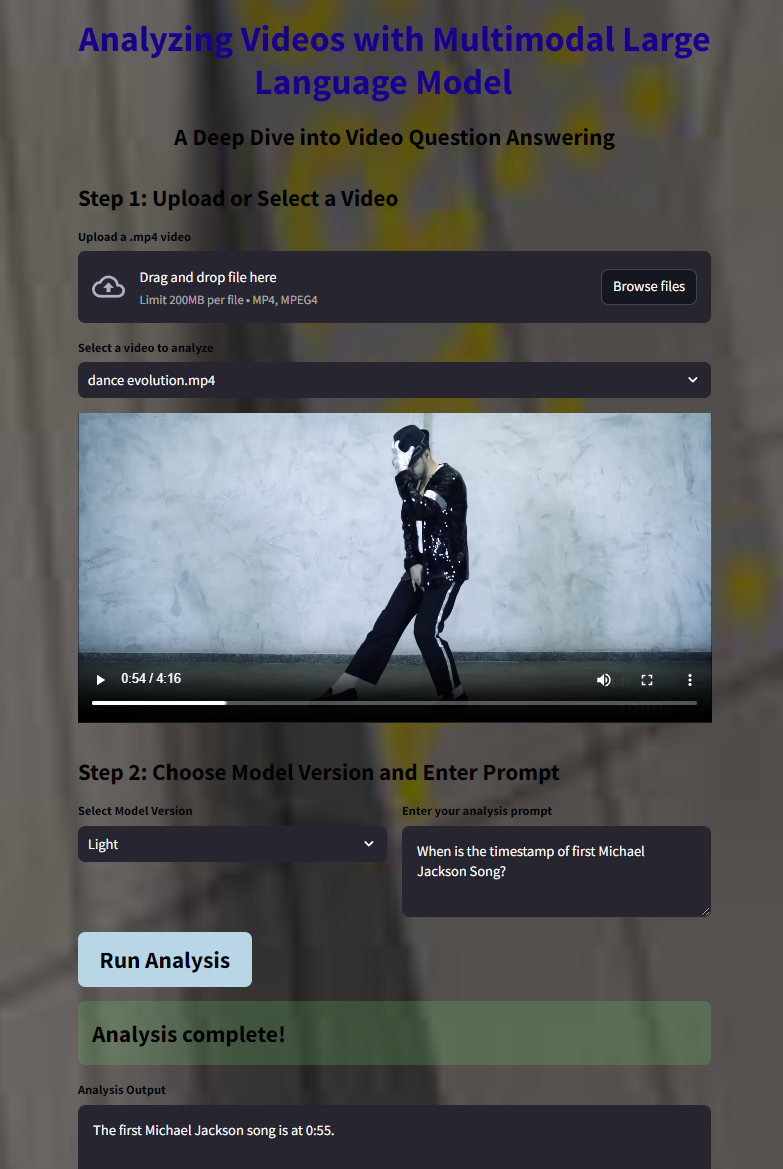
In the ever-evolving field of artificial intelligence, the ability to interpret and analyze video content has opened new frontiers in understanding complex human activities. Gemini 1.5, a multimodal generative AI model developed by Google Cloud’s Vertex AI, is at the forefront of this revolution. In this blog post, we’ll explore how Gemini 1.5 enables video question answering by delving into the intricate world of dance performances. We’ll also walk through a demo application that leverages this technology to decode the artistry and emotion behind complex choreography.
Introduction to Gemini 1.5
Gemini 1.5 is a cutting-edge AI model capable of processing and generating content across multiple modalities, including text and video. It extends the capabilities of large language models by incorporating visual understanding, allowing for sophisticated analysis of video content based on natural language prompts.
How Does Video Question Answering with Gemini 1.5 Work?
Video question answering involves interpreting visual content and providing answers to questions posed in natural language. Here’s how Gemini 1.5 achieves this:
Multimodal Input Processing: The model accepts both the video and the textual question as inputs, encoding them into a unified representation. Contextual Understanding: It captures temporal and spatial features from the video, understanding sequences, actions, and nuances. Content Generation: Using its generative capabilities, Gemini 1.5 produces coherent and contextually relevant answers that reflect an in-depth understanding of the video content.
Decoding Dance Performances: A Novel Use Case
Analyzing dance performances presents a unique challenge due to the abstract nature of movement, emotion, and artistic expression. By applying Gemini 1.5 to this domain, we can gain insights into:
Choreography Breakdown: Understanding the sequence of movements and their significance. Emotional Interpretation: Deciphering the emotions conveyed through the performance. Cultural Context: Identifying cultural elements and influences in the dance.
Let’s explore a demo application that utilizes Gemini 1.5 to analyze dance videos. This application allows users to upload or select dance performances and ask detailed questions to gain deeper insights. The application is built using Streamlit, a Python framework for creating interactive web applications. It integrates with Google Cloud services like Vertex AI for model inference and Cloud Storage for video storage.
Code Walkthrough
Let’s delve into the critical components of the application code to understand how it implements video question answering with Gemini 1.5. We begin by importing necessary libraries and setting up credentials to interact with Google Cloud services.
import os
import base64
from google.oauth2 import service_account
import streamlit as st
from google.cloud import storage
from datetime import timedelta
import vertexai
from vertexai.generative_models import Part, GenerativeModel, SafetySetting
import time

def get_google_credentials():
    google_credentials = st.secrets["google_credentials"]
    return service_account.Credentials.from_service_account_info(google_credentials)

credentials = get_google_credentials()
storage_client = storage.Client(credentials=credentials)
vertexai.init(project="your-project-id", location="us-central1", credentials=credentials)
Designing the User Interface
We use Streamlit to create a visually appealing and user-friendly interface, complete with custom styling.
def set_bg_hack(main_bg):
    """Function to set a background image and style text and buttons"""
    st.markdown(
        """
        <style>
        .stApp
        h1
        h2, p
        label
        div.stButton > button:first-child
        div.stButton > button:first-child:hover
        </style>
        """,
        unsafe_allow_html=True
    )

with open("background.jpg", "rb") as image_file:
    encoded_image = base64.b64encode(image_file.read()).decode()

set_bg_hack(encoded_image)

st.markdown("<h1 style='text-align: center;'>Dance Performance Analyzer</h1>", unsafe_allow_html=True)
st.markdown("<p style='text-align: center;'>Unlock the secrets behind mesmerizing dance performances using AI.</p>", unsafe_allow_html=True)
Video Upload and Selection
Users can upload new dance videos or select existing ones from the Cloud Storage bucket.
def list_videos(bucket_name):
    """Lists .mp4 files from the specified bucket"""
    bucket = storage_client.bucket(bucket_name)
    blobs = bucket.list_blobs()
    return [blob.name for blob in blobs if blob.name.endswith('.mp4')]

def upload_video_to_gcs(bucket_name, video_file):
    """Uploads the video to Google Cloud Storage"""
    bucket = storage_client.bucket(bucket_name)
    try:
        blob_name = "{int(time.time())}_{video_file.name}"
        blob = bucket.blob(blob_name)
        blob.upload_from_file(video_file)
        st.success("Video '{video_file.name}' uploaded successfully as '{blob_name}'!")
        return blob_name
    except Exception as e:
        st.error("Error uploading file: {str(e)}")
        return None

def generate_signed_url(bucket_name, blob_name):
    """Generates a signed URL for the video"""
    bucket = storage_client.bucket(bucket_name)
    blob = bucket.blob(blob_name)
    url = blob.generate_signed_url(expiration=timedelta(minutes=30))
    return url

bucket_name = "dance-performance-analysis-bucket"
if 'uploaded_video_list' not in st.session_state:
    st.session_state.uploaded_video_list = list_videos(bucket_name)

st.markdown("<h2>Step 1: Upload or Select a Dance Video</h2>", unsafe_allow_html=True)
uploaded_video = st.file_uploader("Upload a .mp4 dance video", type=["mp4"])
if uploaded_video is not None:
    with st.spinner("Uploading video..."):
        uploaded_blob_name = upload_video_to_gcs(bucket_name, uploaded_video)
        if uploaded_blob_name:
            st.session_state.uploaded_video_list = list_videos(bucket_name)
            st.success("Video '{uploaded_blob_name}' uploaded successfully!")

selected_video = st.selectbox("Select a video to analyze", st.session_state.uploaded_video_list)
if selected_video:
    video_url = generate_signed_url(bucket_name, selected_video)
    st.video(video_url)
Model Selection and Prompt Input
Users can choose the model version and enter a custom prompt to guide the analysis.
st.markdown("<h2>Step 2: Choose Model Version and Enter Your Question</h2>", unsafe_allow_html=True)

col1, col2 = st.columns(2)

with col1:
    model_version = st.selectbox("Select Model Version", ["Light", "Pro"])
    model_version_mapping = {
        "Light": "gemini-1.5-flash-001",
        "Pro": "gemini-1.5-pro-001"
    }
    selected_model_version = model_version_mapping[model_version]

with col2:
    user_prompt = st.text_area(
        "Enter your question about the dance performance",
        value="Can you provide a detailed breakdown of the choreography and the emotions conveyed in this dance?"
    )
Now lets run the video analysis and display the results.
def analyze_video(video_uri, user_prompt, model_version):
    video_part = Part.from_uri(mime_type="video/mp4", uri=video_uri)
    generation_config = {
        "max_output_tokens": 8192,
        "temperature": 0,
        "top_p": 0.95,
    }
    safety_settings = [
        SafetySetting(
            category=SafetySetting.HarmCategory.HARM_CATEGORY_HATE_SPEECH,
            threshold=SafetySetting.HarmBlockThreshold.BLOCK_MEDIUM_AND_ABOVE
        ),
    ]
    model = GenerativeModel(model_version)
    responses = model.generate_content(
        [video_part, user_prompt],
        generation_config=generation_config,
        safety_settings=safety_settings,
        stream=True
    )
    output = ""
    for response in responses:
        output += response.text
    return output

if st.button("Run Analysis"):
    with st.spinner("Analyzing video..."):
        video_uri = "gs://{bucket_name}/{selected_video}"
        analysis_result = analyze_video(video_uri, user_prompt, selected_model_version)
        if analysis_result:
            st.success("Analysis complete!")
            st.text_area("Analysis Output", analysis_result, height=300)
Safety Considerations
We implement safety settings to ensure that the generated content is appropriate and adheres to ethical guidelines. Safety settings are an important aspect of using generative AI models, especially when dealing with sensitive or controversial topics. Gemini 1.5 includes safety settings that can be configured to block or filter out harmful content. In our application, we’ve set up a basic safety configuration to block hate speech. However, users can further customize these settings based on their specific needs and the nature of the content they’re working with.
safety_settings = [
    SafetySetting(
        category=SafetySetting.HarmCategory.HARM_CATEGORY_HATE_SPEECH,
        threshold=SafetySetting.HarmBlockThreshold.BLOCK_MEDIUM_AND_ABOVE
    ),
    SafetySetting(
        category=SafetySetting.HarmCategory.HARM_CATEGORY_DANGEROUS_CONTENT,
        threshold=SafetySetting.HarmBlockThreshold.BLOCK_MEDIUM_AND_ABOVE
    ),
    ]
Expanding on my work
Imagine uploading a contemporary dance performance that blends classical ballet with modern hip-hop. By asking, “What are the key themes and emotions conveyed in this performance?” Gemini 1.5 can provide an analysis like the performance showcases a fusion of classical and modern dance styles, symbolizing the merging of tradition and innovation. The dancers exhibit emotions of conflict and harmony, portraying a journey from struggle to unity. The use of fluid movements contrasted with sharp, dynamic steps highlights the duality of the themes presented.
Gemini 1.5 leverages advanced machine learning techniques to interpret video content:
- Temporal Modeling: Analyzes the sequence of movements over time to understand choreography.
- Spatial Recognition: Identifies positions and interactions between dancers.
- Emotion Detection: Infers emotional cues from body language and facial expressions.
- Contextual Language Generation: Generates detailed and contextually relevant narratives.
Applications Beyond Dance
While our example focuses on dance, the capabilities of Gemini 1.5 extend to various domains:
- Sports Analysis: Breaking down plays and strategies in sports footage.
- Educational Content: Summarizing key concepts from lecture videos.
- Wildlife Observation: Interpreting animal behaviors in nature documentaries.
- Art Critique: Analyzing techniques and themes in visual art videos.
Getting Started with Your Own Analysis
- Set Up Google Cloud Account: Ensure you have access to Vertex AI and Cloud Storage.
- Clone the Repository: Obtain the application code and set up the environment.
- Prepare Your Videos: Use videos that you have the rights to analyze.
- Customize the Application: Modify prompts and settings to suit your use case.
Conclusion
Gemini 1.5 revolutionizes the way we interpret and interact with video content. By unlocking insights from complex dance performances, we gain a deeper appreciation for the artistry and emotion conveyed through movement. This technology holds immense potential across various fields, offering new avenues for understanding and creativity. I encourage you to explore this application and consider how Gemini 1.5 can be applied to your domain. The fusion of AI and human creativity opens doors to innovations we are only beginning to imagine.
References
- Google Cloud Vertex AI
- Streamlit Documentation Understanding Dance Movements